CAVEAT: What follows may appear somewhat alarming due to the possibility of the topic being taken out of context. Considering the length of the explanation below it would be easy to assume the situations described to be common place and therefore put a far greater significance to them than exist in reality. Suffice to say that the issues described are rare but could happen; hence the explanation.
The cygnus Dedupe does rely on the fact that the data entering a Dedupe process has been analysed and understood, and that only sensible data is introduced. It is fully appreciated that this is not always possible and for that reason every effort is made to accommodate difficult data.
One very common category of difficult data is ‘Large Groups’. Traditional Dedupes, and cygnus is no different, drag groups of records together based upon a series of keys. Although somewhat simplified for sake of clarity assume that for each record entered into a Dedupe 5 separate keys are generated:
• Surname+Thoughfare
• Surname+Initial
• Company
• 1st Line of Address (massaged)
• Postcode
If the ‘Speed’ button is not selected then a further 3 keys are generated:
• PO Box
• Thoroughfare+Town
• Building+Town
The picture below reflects the speed button when set on.
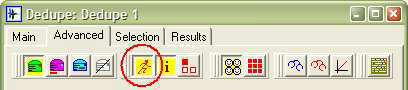
Clearly, the more keys generated then the greater chance of bringing 2 records together to match, and so by setting the speed button on we have reduced the chances of finding a match. The point here is that for every option there is an inevitable trade-off. If there were no trade-off then there would be little point in
having the option available. This is however a digression away from the topic of group sizes albeit a useful illustration of a principle of why options exist.
Having built a number of keys for each record, then the laborious process starts by taking all the records that share a given key for analysis. Now we come to a point where a pragmatic decision has to be made. Consider the maths:
A group of 2 records has 1 record match process to make. A group of 3 records has 3 to make. A group of 10 has 45 to make. A group of 50 has 1,225 to make. A group of 100 has 4,950 to make. (The formula is (N-1) * ½ N).
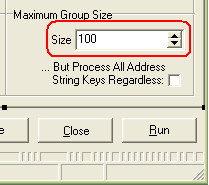
It can be seen that the progression is geometric and so there must come a point where it becomes unpractical in terms of time taken to process a large group. The setting in the Maximum Group Size determines this ceiling. Traditionally the default is set at 100 although this factory setting can altered to have a different default.
Regardless of the initial default the setting can be changed on the Advanced tab of the Dedupe form in the bottom right hand corner. See below.
This begs the question as to what happens to a group that is too big. The answer is it is simply ignored. The rationale behind this is that potentially matching records will be drawn together under a different key; bearing in mind that there are potentially 8 keys for each record.
Consider the following fictional name and address:
Mr John Smith
14 High Street
Margate
Kent
CT23 6RF
Also assume that Mr Smith is a record in a mailing file of 1,000,000 records in total. Now let’s look at some possible scenarios around group sizes.
First take the Surname+Thoroughfare key which would yield SMITHHIGH. It is more than possible that there will be in excess of 100 Smiths living or working in a High Street. If so then that group will be ignored.
Now the Surname+Initial key which gives SMITHJ. We will have lots of Smiths but they at least will be sub-divided into SMITHA, SMITHB etc and so some of the groups will be below the threshold whilst other will remain above. For arguments sake let’s assume that we have more than 100 J Smiths in our file and so that group will also be ignored.
It can be seen that for a large Dedupe input volume common surnames are vulnerable to large group sizes.
Next up we have the Company key. There is no company and so we can move on. If however there has been a company then that would probably/possibly given a group less than 100 and then we would be in business. Remember that we only need 1 key to be analysed for a decision to be made.
The next key is the 1st Line of Address which produces something akin to 14HGHSTRT. Now there are almost certainly more than 1 hundred 14 High Streets in the UK but statistically there are probably less than 100 in a mailing file of 1,000,000. In other words we will probably get a group to process on this key. That said let pessimism reign and we’ll assume that there were over 100 of them. We will be returning to this key later but in the mean time we are running out of options.
Enter the Postcode key which in our case gives us CT236RF. Statistically it would be extremely unlucky to have over 100 Smiths at the same Postcode. It is also unlikely, and reasonable to assume, that we do not have more than 100 records with this postcode in the file. For that reason this key will virtually guarantee a group that can be processed.
There is a possible glitch in that it is entirely possible that we have a matching record that happens not to have a postcode. If this is true then that record would not be in the group of CT236RF and so would not be matched. What this means is that although we would probably identified matches we may not have identified all matches. To feel comfortable we need other keys to work for us.
At this point we need to consider if we have opted for a faster Dedupe through the ‘Speed’ button. If so then there are no more keys to attempt a group. If not then we have another 3 possible keys to try. In our case the PO Box and Building+Town keys yield nothing but the Thoroughfare+Town key does produce HIGHMARGATE. Again we are dealing in statistics but it is virtually inconceivable that out of 1 million records we have more than 100 that are based in the Margate’s High Street.
So in conclusion: if the speed button is not down then our Mr Smith will find matches if they exist. If the speed button is down then we will probably find matches although there is the possibility that some may be lost due to blank postcodes.
When to act and what to do
The biggest issue is of knowing when to act and what to do about it. There is absolutely no substitute for knowing and understanding the data. That said, it is recognised that this is not always possible and that there needs to be warnings in place to identify potential issues.
The most important tool available is the Large Groups Warning box that is generated whilst the keys are being constructed. It can be set on as a default but below the pictures shows the button affected by the setting i.e. information is set on.
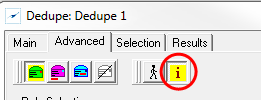
Now after the keys are built a passive box is displayed alongside the Dedupe that shows statistics on the keys generated. In the example below we have a Dedupe containing 101 identical records in both terms of name and address – in fact our Mr Smith record.
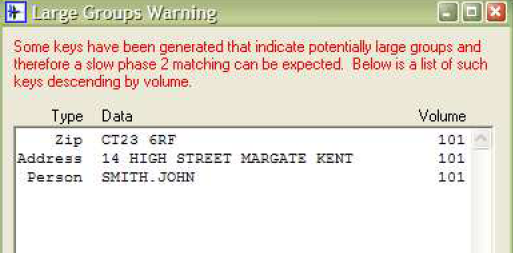
You can see that we are showing that we have 101 identical postcodes, 101 identical John Smith and of course 101 identical addresses.
If the Dedupe has been set up with the default Maximum Group Size of 100 then unfortunately the result will be 101 unique records. See below.
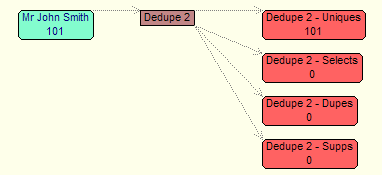
The reason is because all keys generated exceed the 100 ceiling and so no groups are analysed.
Clearly this is not a good situation but we did have a warning in that we knew we had keys in excess of the limit. What we should have considered is increasing the maximum group size to say 200. Below it has been increased to exactly 101.
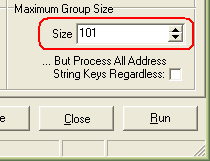
Upon re-running the Dedupe we find we get 1 group of 101 dupes (1 select and 100 drops). See below.
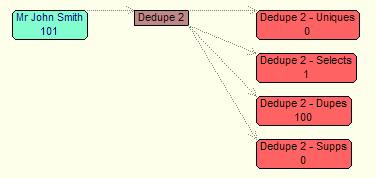
Alternatively, we could have left the maximum group size setting as 100, and instead checked on the ‘Process All Address String Keys Regardless’ option.
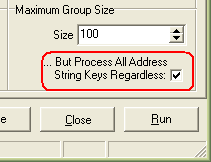
Had we done this and re-run we would again have found the matches. See below.
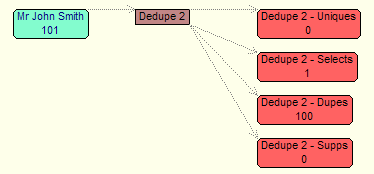
The reason for the success is because all the records in the 1st Line of Address key of 14HGHSTRT were analysed regardless of the size of group.
Some users may prefer to permanently set on this option and take the trade-off of a slightly slower process. Some users may choose to set the default maximum group size to be much higher than 100.
There is no recommendation here because it is so dependant upon both data and processing time constraints.
Regardless of the decision made, do be aware that the volumes for the different categories in the Large Groups Warning box can be configured in the Master settings as shown below.
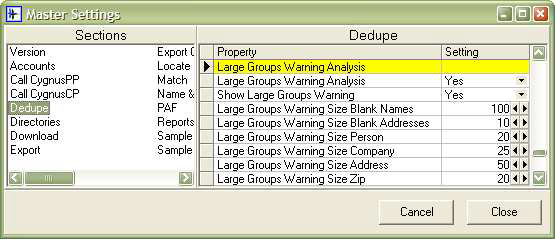
In conclusion, when dealing with unanalyzed data or data that is suspected of having these exceptional group sizes then it is recommended that one or more of the following should be considered:
• Switch on the Large Groups warning.
• Up the Maximum Group Size to the appropriate level after the Large
Groups Warning box has been delivered.
• Switch on the processing of Address String Keys Regardless.
0 Comments