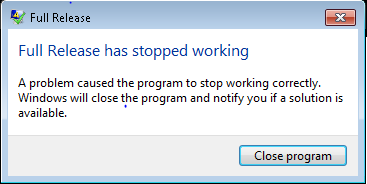
“Full release stopped working error message” received when trying to export file…
[Question(s) to ask:]
Can you confirm whether you have a valid default printer installed?
Why? Because this is required to work with the Cygnus PDF processes.
Do you have permissions for the folder you are outputting to?
[This works :)]
As a test, can you change your default printer and attempt to open Cygnus again? If unsuccessful, change back the printer and try Cygnus again. Let us know the outcome please.
Or
Log in as a different user, then log back in with your details - this seems to fix issue also. Not sure if it could be something problematic in cache that is cleared”
[Further solutions…]
Ask client to run as administrator – if this works - it means there are restrictions with the user's profile. Insufficient access/ permissions, user may need to be elevated to Full Control to ensure they have unrestricted access to the systems folders (Resources, Jobs, softwareBureau etc.). Equally, this message could be triggered by a wiped sysSettings.ini file.
“I logged in as a different user, then logged back in as me and it seems OK. Not sure if there was something problematic in cache that has now cleared”
NB. If no printer is installed then Cygnus will not launch at all, however, there are examples where Microsoft XPS printer as been a default thus Cygnus was able to start but stumbled when PDF output was required at the export stage.
0 Comments