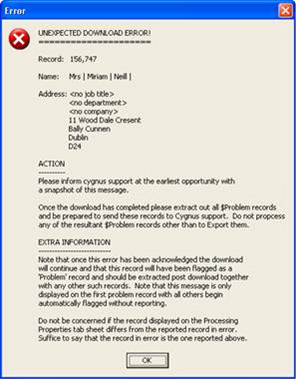
If you delete the Download module and re-import, does the error re-occur? If yes, read on...
If you click ‘OK’ the download process will continue and any problem records will get flagged. Do a Splerge to separate the problem records by using the flag ‘$Problem’ = ‘Y’ you will be able to continue your process with the rest of the file. If it only flags a few records could you send them over to us to investigate further please? However, if the majority of the file is flagged let me know so we can look at it in a different light.
The Splerge is below:
Selectfirst
$Problem = 'Y' : writeto ('Rejects')
Rest : WriteTo('sp1File1')
I recommend you test this thoroughly before using in a live environment.
Optional
In Cygnus, if you navigate to: Tools > Options > Master settings > Download > Processing properties > Report Problem Records > then select ‘None’, this will skip the problem records and continue with the process.
Removing special processing in download and add the fields in a Splerge could fix the problem. At a minimum it should make it more reliable. The error is a Burst error if it only affects a few records (say less than 7 or 8) they need to send the records over to us so we can add their patterns to the Burst rules.
If however it affects lots of records it’s a problem with the special processes (though it is very intermittent) so they need to remove these to make it more reliable for auto running.
0 Comments