UAC Install error?
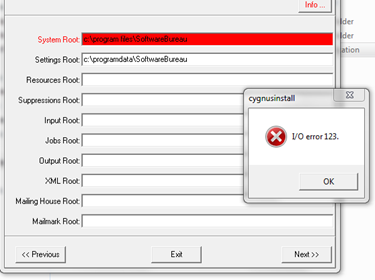
Is the installer local e.g. c drive
Note: Not ALL Desktops are on the C:/ Drive… (if .exe is running from desktop, worth copying .exe to C:\ Root)
Can’t see all mapped drives? - Check UAC.
User Account Control (UAC) – Otherwise known as the Windows Virtual Store
With Cygnus switched off…
Type in the start menu ‘UAC’. [in Win8 – Control Panel/ select user accounts/Change] and click on ‘Change User Account Controls’, the slider should be all the way at the bottom on ‘never notify’ Once off (never notify) the computer will need a restart. When the computer has restarted have a look in the below folders as these are the ones Windows likes to stash away any changes to programs, then proceed to delete any Cygnus 4.?.? files.
C:\Users\*current logged in user*\AppData\Local\VirtualStore\Program Files\SoftwareBureau
C:\Users\*current logged in user*\AppData\Local\VirtualStore\ProgramData\SoftwareBureau
In Addition:
There was an occasion issue where everything was pointing to permissions, however, Cygnus was referencing the drive by a drive letter (E:). The drive is mapped on the server as drive E and can be accessed by DOS through the drive letter. However, the Cygnus installer for whatever reason could not see drive E.
Replacing E:\ with \\XXXXXX (server name) should solve the issue.
Alternatively, you can append a Resources folder locally and use it as a temporary location (point to it during installation) and once installed re-direct (via sysSettings.ini) to the correct/ original Resources location.
0 Comments