Format 7 only has 6 characters of free space for user data.
Format 9 has 45 characters of free space.
Format 29 has 25 characters of free space.
Use MailMarkEXTRA USP option to build barcodes with choice of string e.g. client details, ref no: etc. Can be mapped to a field or to a Static position.
Double click on the RM output file, right click on the Viewer to select Fields. Navigate to $Sort fields and select $Mailmarks (x4) to view .
The $Mailmarks (x4) will display all the barcodes that are available and will end with a long space and then an X if there is no client data appended.
How to Add client data
In the USP on the General Tab click on the DropDown list to reveal the options:
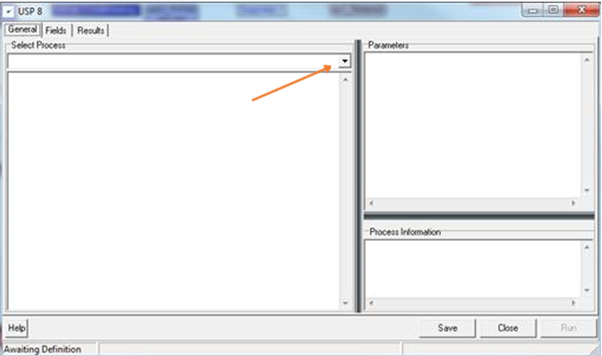
Select Mailmark Extra, a description on how to use this option will be displayed in the window below.
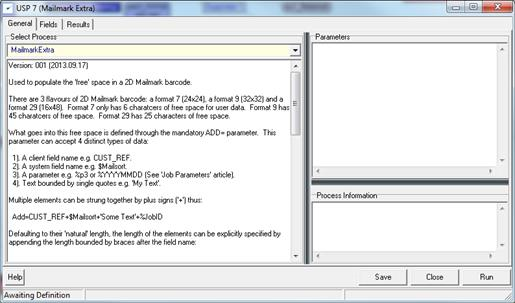
The example shows you how to add the sort sequence and bag number to the end of the barcode string.
Type 9 is the default value so it is necessary in this example to change the default to TYPE 29 by using AddTo=29.
e.g. AddTo=29
Add=$BagNo+$SortSeq
Once completed double click the USP output and append the $Mailmarks (x4) option again to view the string you have added to the barcode.
Barcode = $Mailmark(x4) -------------- displays -------------a Barcode 159632874753etc X
The ‘X’ is only present if there has not been any client info appended
Add to the barcode string using…
Static = Typed info
Dynamic= a seloected field
System params = $ and % fields
Following USP module process the requested details will be added to the Barcode like below:
159632874753 "clientAddedDetails"
0 Comments