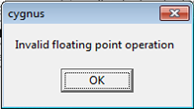
This instance the client was doing a Match pre mailsort and wasn’t carrying forward the $name and $addr, which he was in another file, the client then ran the mailsort on that file and it was fine, so revisited the Match and redone it ensuring to output the $fields and said ‘hey presto’ it worked.
OR
The cell is for a quantity of 1,409 - usually this wouldn't be a problem, but as all of the records are foreigns, we would normally run this to get them in country order.
OR
Are there any ambiguous characters? i.e. postcode reads: 0X33 1AW instead of OX33 1AW
Where the first example has a zero at the beginning instead of a capital ‘O’
Support
Q: Can you confirm that you have mapped all your fields correctly?
Can you open a new job and see if you are still experiencing errors with the RMSorts?
Please also check, that your naming conventions for this job does not have any hidden spaces in the name (e.g. at the end)
A: I have found the problem - your question about “mapping field names correctly” made me realise that I was not using A1, A2, A3 etc. so this is what it was. The client sent us various address fields and I kept them named as sent and not A1, A2, A3 etc.
All sorted now
0 Comments