Overview
There have been occasions recently where clients have needed to reprocess a Mailmark sort. In itself, this isn’t an issue, EXCEPT where the mail pieces have already been printed. The process of rerunning the sort reproduces the Item ID’s which means when the eManifest is uploaded to eMHS,it doesn’t match the Barcode on the already printed mail. This is then considered to be ‘Unmanifested mail’ and might attract a surcharge, plus the ability to track and report the campaign in question is lost.
Rather than introduce an option into the sort engine via a checkbox or similar, to either retain or regenerate the Item ID, we have written a utility to renumber it within the eManifest itself.
Examples
Below is an example of the data within a sorted file:-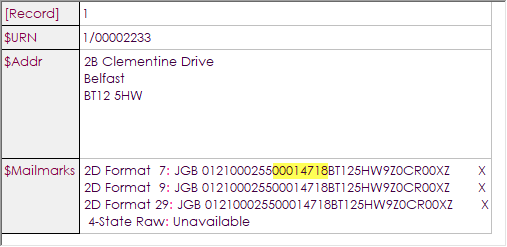
It shows the Item ID highlighted, starting at number 00014718 on the first record.
The last record appears as below:-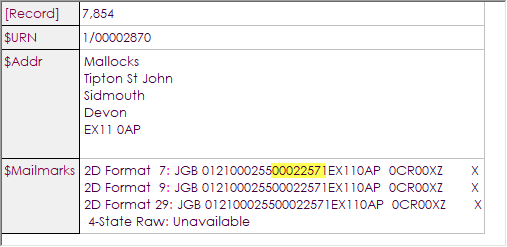
The eManifest contains this range and shows the start and end number:-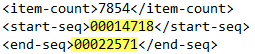
The first and last ‘item detail’ records in the eManifest also contain this start and end seq, or Item
ID:-
First

Last

So, they all match and the mailing is correctly managed and tracked through the appropriate systems.
However, let’s see what happens if the sort is reprocessed. The mailing has already been printed, so the barcode contains the original Item ID’s ranging from ‘00014718’ to ‘00022571’ as shown above.
Below is a screen capture of the data after the reprocessing of the sort:-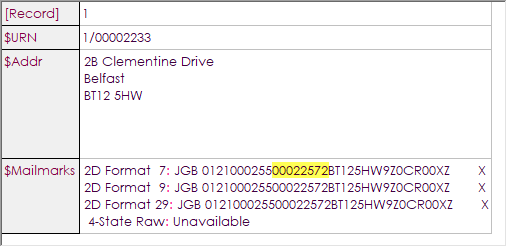
As you can see, the Item ID now starts from 00022572 and does not now match the already printed items. This will result in an ‘unmanifested’ mailing and may attract the surcharge mentioned previously.
The Solution
The ItemID will need to be reallocated in the eManifest and to do this, launch the utility called ‘MMRenumbering.exe’ which should reside in the folder ‘C:\Program Files (x86)\SoftwareBureau\Gemma\’.
The following form will load:-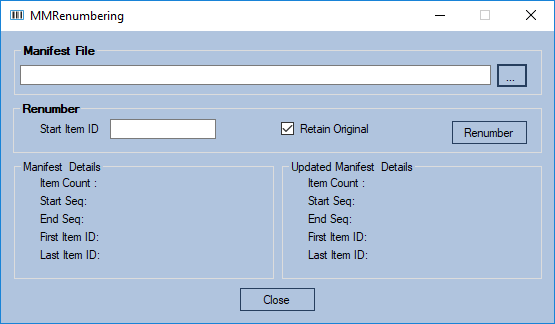
Click on the ‘browse’ button to navigate to the location of the relevant eManifest:-
Once located, double click the eManifest, which will import it into the utility:-
It will also display the current item count, start and end sequence, and start and end Item ID:-
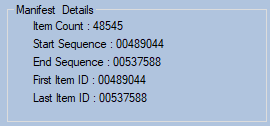
We now need to reallocate the Item ID’s in the eManifest. To do this, you need to know the start Item ID number from the printed mailing – this is the only parameter required.
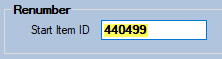
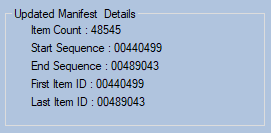
Let’s assume the first Item ID is 440,499. This would be the case if the original sort was the last one run as it’s 48,545 lower than the start Item ID number in the form above.
So, enter that value in the ‘Start Item ID’ box:-
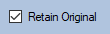
The only other option prior to running is whether you wanted to retain the original eManifest file. This might be useful as a record of what has occurred. The box is already checked by default, so uncheck if you do not wish to do this:-
Now click ‘Renumber’ –
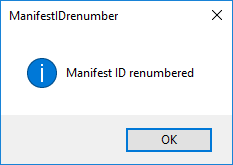
When completed – it should only take a couple of seconds – the following message will be displayed:-
Click ‘OK’ and the form will now display the new Item ID’s as below:-
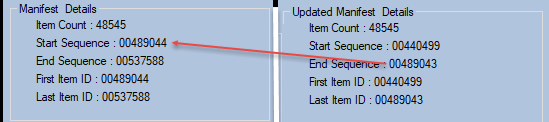
As you can see below, the last Item ID is now one number prior to the Item ID allocated when the sort was re-run and will now match the already printed items:-
The user can then check these against the printed mail and/or the original copy of the eManifest if the option Retain Original was set to ‘Y’. The original eManifest has a file extension of ‘.original’ as you can see below:-

The new eManifest can now be submitted via GeMMA.
0 Comments